Feed aggregator
FileMaker 13: More Polished but Pricey – TidBITS
FileMaker 13: More Polished but Pricey
TidBITS
Version 12 saw another new file format, but one that simply enabled new design features and left the underlying data structures unbroken. The good news for all except developers specialising in upgrade conversion is that file structures again remain …
Repository APIs
Page edited by Asger Askov Blekinge
View Online Asger Askov Blekinge 2014-01-24T15:23:13ZRepository APIs
Page edited by Asger Askov Blekinge
View Online Asger Askov Blekinge 2014-01-24T15:23:13ZRepository APIs
Page edited by Asger Askov Blekinge
View Online Asger Askov Blekinge 2014-01-24T12:14:49ZRepository APIs
Page edited by Asger Askov Blekinge
View Online Asger Askov Blekinge 2014-01-24T12:14:49ZScout Virtual Hackathon
Page edited by Peter May
View Online Peter May 2014-01-24T10:41:10ZScout Virtual Hackathon
Page edited by Peter May
View Online Peter May 2014-01-24T10:41:10ZSCAPE Stories
Page edited by Sven Schlarb
View Online Sven Schlarb 2014-01-23T15:38:08ZSCAPE Stories
Page edited by Sven Schlarb
View Online Sven Schlarb 2014-01-23T15:38:08ZWikipedia: The Go-to Source for Information About Digital Preservation?
The following is a guest post from Andrea Goethals, Digital Preservation and Repository Services Manager at the Harvard University Library, with contributions from Stephen Paul Davis, Director of Columbia University Libraries Digital Program Division and Kate Zwaard, Supervisory IT Specialist, Repository Development, Library of Congress. Andrea and Kate co-chair the NDSA Standards and Practices Working Group.
When you hear about something that is new to you – where is the first place you usually go to learn more about it? If you’re like most of us, you usually find yourself reading a Wikipedia article. In fact, Wikipedia is the sixth most popular website. That was the inspiration behind the NDSA Standards and Practices Working Group’s project, started in 2012, to use Wikipedia as a platform to expose information about digital preservation standards and best practices. Since people are already going to Wikipedia for information, why not leverage it to build upon the information that is already there?
A Challenging Undertaking!
This idea proved more challenging than it first appeared. Wikipedia’s main article about digital preservation wasn’t in a state where the group could easily attach related articles on particular standards and best practices. Information about digital preservation in Wikipedia was spread out over multiple articles and important areas were completely left out while other areas were fairly detailed but out-of-date, some came from a non-library perspective, and some were poorly written or biased. In fact, the poor quality of the article hadn’t gone without notice by Wikipedia editors and there were banners at the top of the page warning readers:
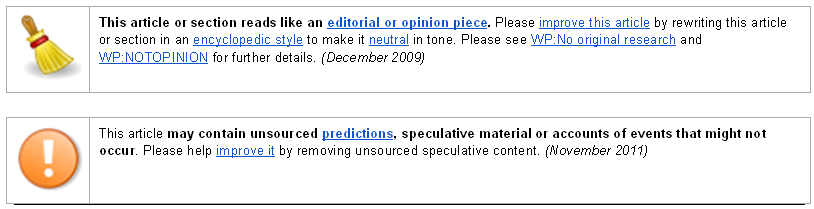
Disclaimer banners at the top of the page Digital Preservation Wikipedia page.
Digital Preservation WikiProject
The group decided that the first step was to improve Wikipedia’s core article about digital preservation to provide a more complete scaffolding from which subsidiary articles on standards and best practices could be hung. A small group took on the task of writing an outline for reorganizing and adding to the existing Digital Preservation article and then started writing new sections including:
The logo for WikiProject Digital Presevation
Despite the state of the Digital Preservation article, the group recognized that Wikipedia could still be a good platform to expose a wider audience to digital preservation standards and best practices, so a “WikiProject” was set up to organize the work.- Definition of digital preservation
- Challenges of digital preservation
- Intellectual foundations of digital preservation in libraries
- Specific tools and methodologies
- CRL certification and assessment of digital repositories
- Digital preservation best practices for audio, moving images and email
This was such an improvement to the quality of the Digital Preservation article that the disclaimers at the top of the article were removed.
This project couldn’t have been done without the dedication of Stephen Paul Davis and Dina Sokolova from Columbia University Libraries who provided the needed editorial oversight and wrote most of the new content. In addition, key contributions were made by Priscilla Caplan, formerly of the FCLA, Linda Tadic of the Audiovisual Archive Network and Chris Dietrich and Jason Lautenbacher, both from the U.S. Park Service.
What’s Next? How You Can Help
Wikipedia’s digital preservation articles need ongoing oversight, but this is a responsibility that should be distributed broadly. Please take a look at the article and outline and consider contributing in your areas of expertise. If you’re looking for a leadership opportunity in digital preservation, the NDSA is looking for someone who can help encourage participation in the WikiProject and act as a liaison to the coordinating committee. If you’re interested, please contact Stephen Paul Davis at [email protected].
Standing on the Shoulders of your peers
In December last year I attended a Hadoop Hackathon in Vienna. A hackathon that has been written about before by other participants: Sven Schlarb‘s Impressions of the ‘Hadoop-driven digital preservation Hackathon’ in Vienna and Clemens and René‘s The Elephant Returns to the Library…with a Pig!. Like these other participants I really came home from this event with a lot of enthusiasm and fingers itching to continue the work I started there.
As Clements and René writes in their blog post on this event, collaboration had, without really being stated explicit, taken centre place and that in it self was a good experience.
For the hackathon Jimmy Lin from the University of Maryland had been invited to present Hadoop and some of the adjoining technologies to the participants. We all came with the hope of seeing cool and practical usages of Hadoop for use in digital preservation. He started his first session by surprising us all with a talk titled: Never Write Another MapReduce Job. It later became clear Jimmy enjoys this kind of gentle provocation like in his 2012 article titled If all you have is a hammer, throw away everything that is not a nail. Jimmy, of course, did not want us to throw away Hadoop. Instead he gave a talk on how to get rid of all the tediousness and boiler plating necessary when writing MapReduce jobs in Java. He showed us how to use Pig Latin, a language which can be described as an imperative-like, SQL-like DSL language for manipulating data structured as lists. It is very concise and expressive and soon became a new shiny tool for us developers.
During the past year or so Jimmy had been developing a Hadoop based tool for harvesting web sites into HBase. This tool also had its own piggy bank which is what you call a library of user defined functions (UDFs) for Pig Latin. So to cut the corner those of us who wanted to hack in Pig Latin cloned that tool from Github: warcbase. As a bonus this tool also had an UDF for reading ARC files which was nice as we had a lot of test data in that format, some provided by ONB and some brought from home.
As an interesting side-note, the warcbase tool actually leverages another recently developed digital preservation tool, namely JWAT, developed at the Danish Royal Library.
As Clemens and René writes in their blog post they created two UDFs using Apache Tika. One UDF for detecting which language a given ARC text-based record was written in and another for identifying which MIME type a given record had. Meanwhile another participant Alan Akbik from Technischen Universität Berlin showed Lin how to easily add Pig Latin unit tests to a project. This resulted in an actual commit to warcbase during the hackathon adding unit tests to the previously implemented UDFs.
Given those unit tests I could then implement such tests for the two Tika UDFs that Clemens and René had written. These days unit test are almost ubiquitous when collaborating on writing software. Apart from their primary role of ensuring the continued correctness of refactored code, they do have another advantage. For years I’ve preferred an exploratory development style using REPL-like environments. This is hard to do using Java, but the combination of unit tests and a good IDE gives you a little of that dynamic feeling.
With all the above in place I decided to write a new UDF. This UDF should use the UNIX file tool to identify records in an ARC file. This task would aggregate the ARC reader UDF by Jimmy, the Pig unit tests by Alan and lastly a Java/JNA library written by Carl Wilson who adapted it from another digital preservation tool called JHOVE2. This library is available as libmagic-jna-wrapper. I, off course, would also rely heavily on the two Tika UDFs by Clemens and René and the unit tests I wrote for those.
Old MagicThe “file” tool and its accompanying library “libmagic” is used in every Linux and BSD distribution on the planet, it was born in 1987, and is still the most used file format identification tool. It would be sensible to employ such a robust and widespread tool in any file identification environment especially as it is still under development. As of this writing, the latest commit to “file” was five days ago!
The “file” tool is available on Github as glenc/file.
“file” and the “ligmagic” library are developed in C. To employ this we therefore need to have a JNA interface and this is exactly what Carl finished during the hackathon.
Maven makes it easy to use that library:
<dependency> <groupId>org.opf-labs</groupId> <artifactId>lib-magic-wrapper</artifactId> <version>0.0.1-SNAPSHOT</version> </dependency>which gives access to “libmagic” from a Java program:
import org.opf_labs.LibmagicJnaWrapper; … LibmagicJnaWrapper jnaWrapper = new LibmagicJnaWrapper(); magicFile = “/usr/share/file/magic.mgc”; jnaWrapper.load(magicFile); mimeType = jnaWrapper.getMimeType(is); …There is one caveat in using a C library like this on Java. It often requires platform specific configuration as in this case the full path to the “magic.mgc” file. This file contains the signatures (byte sequences) used when identifying the formats of the unknown files. In this implementation the UDF will take this path as a parameter to the constructor of the UDF class.
Magic UDFWith the above in place is it very easy to implement the UDF which in its completeness is as simple as
package org.warcbase.pig.piggybank; import org.apache.pig.EvalFunc; import org.apache.pig.data.Tuple; import org.opf_labs.LibmagicJnaWrapper; import java.io.ByteArrayInputStream; import java.io.IOException; import java.io.InputStream; public class DetectMimeTypeMagic extends EvalFunc<String> { private static String MAGIC_FILE_PATH; public DetectMimeTypeMagic(String magicFilePath) { MAGIC_FILE_PATH = magicFilePath; } @Override public String exec(Tuple input) throws IOException { String mimeType; if (input == null || input.size() == 0 || input.get(0) == null) { return “N/A”; } //String magicFile = (String) input.get(0); String content = (String) input.get(0); InputStream is = new ByteArrayInputStream(content.getBytes()); if (content.isEmpty()) return “EMPTY”; LibmagicJnaWrapper jnaWrapper = new LibmagicJnaWrapper(); jnaWrapper.load(MAGIC_FILE_PATH); mimeType = jnaWrapper.getMimeType(is); return mimeType; } }Github: DetectMimeTypeMagic.java
Magic Pig LatinA Pig Latin script utilising the new magic UDF on an example ARC file. The script measures the distribution of MIME types in the input files.
register ‘target/warcbase-0.1.0-SNAPSHOT-fatjar.jar’; — The ’50’ argument is explained in the last section define ArcLoader50k org.warcbase.pig.ArcLoader(’50’); — Detect the mime type of the content using magic lib — On MacOS X using Homebrew the magic file is located at — /usr/local/Cellar/libmagic/5.15/share/misc/magic.mgc define DetectMimeTypeMagic org.warcbase.pig.piggybank.DetectMimeTypeMagic(‘/usr/local/Cellar/libmagic/5.16/share/misc/magic.mgc’); — Load arc file properties: url, date, mime, and 50kB of the content raw = load ‘example.arc.gz’ using ArcLoader50k() as (url: chararray, date:chararray, mime:chararray, content:chararray); a = foreach raw generate url,mime, DetectMimeTypeMagic(content) as magicMime; — magic lib includes “; <char set>” which we are not interested in b = foreach a { magicMimeSplit = STRSPLIT(magicMime, ‘;’); GENERATE url, mime, magicMimeSplit.$0 as magicMime; } — bin the results magicMimes = foreach b generate magicMime; magicMimeGroups = group magicMimes by magicMime; magicMimeBinned = foreach magicMimeGroups generate group, COUNT(magicMimes); store magicMimesBinned into ‘magicMimeBinned’;This script can be modified a bit for usage with this unit test
@Test public void testDetectMimeTypeMagic() throws Exception { String arcTestDataFile; arcTestDataFile = Resources.getResource(“arc/example.arc.gz”).getPath(); String pigFile = Resources.getResource(“scripts/TestDetectMimeTypeMagic.pig”).getPath(); String location = tempDir.getPath().replaceAll(“\\\\”, “/”); // make it work on windows ? PigTest test = new PigTest(pigFile, new String[] { “testArcFolder=” + arcTestDataFile, “experimentfolder=” + location}); Iterator <Tuple> ts = test.getAlias(“magicMimeBinned”); while (ts.hasNext()) { Tuple t = ts.next(); // t = (mime type, count) String mime = (String) t.get(0); System.out.println(mime + “: ” + t.get(1)); if (mime != null) { switch (mime) { case “EMPTY”: assertEquals( 7L, (long) t.get(1)); break; case “text/html”: assertEquals(139L, (long) t.get(1)); break; case “text/plain”: assertEquals( 80L, (long) t.get(1)); break; case “image/gif”: assertEquals( 29L, (long) t.get(1)); break; case “application/xml”: assertEquals( 11L, (long) t.get(1)); break; case “application/rss+xml”: assertEquals( 2L, (long) t.get(1)); break; case “application/xhtml+xml”: assertEquals( 1L, (long) t.get(1)); break; case “application/octet-stream”: assertEquals( 26L, (long) t.get(1)); break; case “application/x-shockwave-flash”: assertEquals( 8L, (long) t.get(1)); break; } } } }Github: TestArcLoaderPig.java
The modified Pig Latin script is at TestDetectMimeTypeMagic.pig
¡Hasta la Vista!During this event we had a lot of synergy through collaboration; shouting over the tables, showing code to each other, running each other’s code on non-public test data, presenting results on projectors, and so on. Even late night discussions added significant energy to this synergy. All this is not possible without people actually meeting each other face to face for a couple of days, showing up with great intentions for sharing, learning and teaching.
So, I do hope to see you all soon somewhere in Europe for some great hacking.
Epilogue: Out of heap spaceA couple of weeks ago I was more or less done with all of the above, including this blog post. Then something happened that required us to upgrade our version of Cloudera to 4.5. This again resulted in us changing the basic cluster architecture and then the UDFs stopped working due to heap space out of memory errors. I traced those out of memory errors to the ArcLoader class, which is why I implemented the “READ_SIZE” class field. This field is set when instantiating the class to some reasonable number of kB. In forces the ArcLoader to only read a certain amount of payload data, just enough for Tika and libmagic to complete their format identifications while ensuring we don’t get hundreds-of-megabyte sized strings being passed around.
This doesn’t address the problem of why it worked before and why it doesn’t now. It also doesn’t address the loss of generality. The ArcLoader can no longer provide an ARC container format abstraction in every case. It only works when the job can make do with only a part of the payload of the ARC records. I.e. the given solution would not work for a Pig script that needs to extract the audio parts of movie files provided as ARC records.
As this work has primarily been a learning experience I will stop here — for now. Still, I’m certain that I’ll revisit these issues somewhere down the road as they are both interesting and the solutions will be relevant for our work.
Preservation Topics: IdentificationWeb ArchivingToolsOpen Planets FoundationSCAPEStanding on the Shoulders of your peers
In December last year I attended a Hadoop Hackathon in Vienna. A hackathon that has been written about before by other participants: Sven Schlarb‘s Impressions of the ‘Hadoop-driven digital preservation Hackathon’ in Vienna and Clemens and René‘s The Elephant Returns to the Library…with a Pig!. Like these other participants I really came home from this event with a lot of enthusiasm and fingers itching to continue the work I started there.
As Clements and René writes in their blog post on this event, collaboration had, without really being stated explicit, taken centre place and that in it self was a good experience.
For the hackathon Jimmy Lin from the University of Maryland had been invited to present Hadoop and some of the adjoining technologies to the participants. We all came with the hope of seeing cool and practical usages of Hadoop for use in digital preservation. He started his first session by surprising us all with a talk titled: Never Write Another MapReduce Job. It later became clear Jimmy enjoys this kind of gentle provocation like in his 2012 article titled If all you have is a hammer, throw away everything that is not a nail. Jimmy, of course, did not want us to throw away Hadoop. Instead he gave a talk on how to get rid of all the tediousness and boiler plating necessary when writing MapReduce jobs in Java. He showed us how to use Pig Latin, a language which can be described as an imperative-like, SQL-like DSL language for manipulating data structured as lists. It is very concise and expressive and soon became a new shiny tool for us developers.
During the past year or so Jimmy had been developing a Hadoop based tool for harvesting web sites into HBase. This tool also had its own piggy bank which is what you call a library of user defined functions (UDFs) for Pig Latin. So to cut the corner those of us who wanted to hack in Pig Latin cloned that tool from Github: warcbase. As a bonus this tool also had an UDF for reading ARC files which was nice as we had a lot of test data in that format, some provided by ONB and some brought from home.
As an interesting side-note, the warcbase tool actually leverages another recently developed digital preservation tool, namely JWAT, developed at the Danish Royal Library.
As Clemens and René writes in their blog post they created two UDFs using Apache Tika. One UDF for detecting which language a given ARC text-based record was written in and another for identifying which MIME type a given record had. Meanwhile another participant Alan Akbik from Technischen Universität Berlin showed Lin how to easily add Pig Latin unit tests to a project. This resulted in an actual commit to warcbase during the hackathon adding unit tests to the previously implemented UDFs.
Given those unit tests I could then implement such tests for the two Tika UDFs that Clemens and René had written. These days unit test are almost ubiquitous when collaborating on writing software. Apart from their primary role of ensuring the continued correctness of refactored code, they do have another advantage. For years I’ve preferred an exploratory development style using REPL-like environments. This is hard to do using Java, but the combination of unit tests and a good IDE gives you a little of that dynamic feeling.
With all the above in place I decided to write a new UDF. This UDF should use the UNIX file tool to identify records in an ARC file. This task would aggregate the ARC reader UDF by Jimmy, the Pig unit tests by Alan and lastly a Java/JNA library written by Carl Wilson who adapted it from another digital preservation tool called JHOVE2. This library is available as libmagic-jna-wrapper. I, off course, would also rely heavily on the two Tika UDFs by Clemens and René and the unit tests I wrote for those.
Old MagicThe “file” tool and its accompanying library “libmagic” is used in every Linux and BSD distribution on the planet, it was born in 1987, and is still the most used file format identification tool. It would be sensible to employ such a robust and widespread tool in any file identification environment especially as it is still under development. As of this writing, the latest commit to “file” was five days ago!
The “file” tool is available on Github as glenc/file.
“file” and the “ligmagic” library are developed in C. To employ this we therefore need to have a JNA interface and this is exactly what Carl finished during the hackathon.
Maven makes it easy to use that library:
<dependency> <groupId>org.opf-labs</groupId> <artifactId>lib-magic-wrapper</artifactId> <version>0.0.1-SNAPSHOT</version> </dependency>which gives access to “libmagic” from a Java program:
import org.opf_labs.LibmagicJnaWrapper; … LibmagicJnaWrapper jnaWrapper = new LibmagicJnaWrapper(); magicFile = “/usr/share/file/magic.mgc”; jnaWrapper.load(magicFile); mimeType = jnaWrapper.getMimeType(is); …There is one caveat in using a C library like this on Java. It often requires platform specific configuration as in this case the full path to the “magic.mgc” file. This file contains the signatures (byte sequences) used when identifying the formats of the unknown files. In this implementation the UDF will take this path as a parameter to the constructor of the UDF class.
Magic UDFWith the above in place is it very easy to implement the UDF which in its completeness is as simple as
package org.warcbase.pig.piggybank; import org.apache.pig.EvalFunc; import org.apache.pig.data.Tuple; import org.opf_labs.LibmagicJnaWrapper; import java.io.ByteArrayInputStream; import java.io.IOException; import java.io.InputStream; public class DetectMimeTypeMagic extends EvalFunc<String> { private static String MAGIC_FILE_PATH; public DetectMimeTypeMagic(String magicFilePath) { MAGIC_FILE_PATH = magicFilePath; } @Override public String exec(Tuple input) throws IOException { String mimeType; if (input == null || input.size() == 0 || input.get(0) == null) { return “N/A”; } //String magicFile = (String) input.get(0); String content = (String) input.get(0); InputStream is = new ByteArrayInputStream(content.getBytes()); if (content.isEmpty()) return “EMPTY”; LibmagicJnaWrapper jnaWrapper = new LibmagicJnaWrapper(); jnaWrapper.load(MAGIC_FILE_PATH); mimeType = jnaWrapper.getMimeType(is); return mimeType; } }Github: DetectMimeTypeMagic.java
Magic Pig LatinA Pig Latin script utilising the new magic UDF on an example ARC file. The script measures the distribution of MIME types in the input files.
register ‘target/warcbase-0.1.0-SNAPSHOT-fatjar.jar’; — The ’50’ argument is explained in the last section define ArcLoader50k org.warcbase.pig.ArcLoader(’50’); — Detect the mime type of the content using magic lib — On MacOS X using Homebrew the magic file is located at — /usr/local/Cellar/libmagic/5.15/share/misc/magic.mgc define DetectMimeTypeMagic org.warcbase.pig.piggybank.DetectMimeTypeMagic(‘/usr/local/Cellar/libmagic/5.16/share/misc/magic.mgc’); — Load arc file properties: url, date, mime, and 50kB of the content raw = load ‘example.arc.gz’ using ArcLoader50k() as (url: chararray, date:chararray, mime:chararray, content:chararray); a = foreach raw generate url,mime, DetectMimeTypeMagic(content) as magicMime; — magic lib includes “; <char set>” which we are not interested in b = foreach a { magicMimeSplit = STRSPLIT(magicMime, ‘;’); GENERATE url, mime, magicMimeSplit.$0 as magicMime; } — bin the results magicMimes = foreach b generate magicMime; magicMimeGroups = group magicMimes by magicMime; magicMimeBinned = foreach magicMimeGroups generate group, COUNT(magicMimes); store magicMimesBinned into ‘magicMimeBinned’;This script can be modified a bit for usage with this unit test
@Test public void testDetectMimeTypeMagic() throws Exception { String arcTestDataFile; arcTestDataFile = Resources.getResource(“arc/example.arc.gz”).getPath(); String pigFile = Resources.getResource(“scripts/TestDetectMimeTypeMagic.pig”).getPath(); String location = tempDir.getPath().replaceAll(“\\\\”, “/”); // make it work on windows ? PigTest test = new PigTest(pigFile, new String[] { “testArcFolder=” + arcTestDataFile, “experimentfolder=” + location}); Iterator <Tuple> ts = test.getAlias(“magicMimeBinned”); while (ts.hasNext()) { Tuple t = ts.next(); // t = (mime type, count) String mime = (String) t.get(0); System.out.println(mime + “: ” + t.get(1)); if (mime != null) { switch (mime) { case “EMPTY”: assertEquals( 7L, (long) t.get(1)); break; case “text/html”: assertEquals(139L, (long) t.get(1)); break; case “text/plain”: assertEquals( 80L, (long) t.get(1)); break; case “image/gif”: assertEquals( 29L, (long) t.get(1)); break; case “application/xml”: assertEquals( 11L, (long) t.get(1)); break; case “application/rss+xml”: assertEquals( 2L, (long) t.get(1)); break; case “application/xhtml+xml”: assertEquals( 1L, (long) t.get(1)); break; case “application/octet-stream”: assertEquals( 26L, (long) t.get(1)); break; case “application/x-shockwave-flash”: assertEquals( 8L, (long) t.get(1)); break; } } } }Github: TestArcLoaderPig.java
The modified Pig Latin script is at TestDetectMimeTypeMagic.pig
¡Hasta la Vista!During this event we had a lot of synergy through collaboration; shouting over the tables, showing code to each other, running each other’s code on non-public test data, presenting results on projectors, and so on. Even late night discussions added significant energy to this synergy. All this is not possible without people actually meeting each other face to face for a couple of days, showing up with great intentions for sharing, learning and teaching.
So, I do hope to see you all soon somewhere in Europe for some great hacking.
Epilogue: Out of heap spaceA couple of weeks ago I was more or less done with all of the above, including this blog post. Then something happened that required us to upgrade our version of Cloudera to 4.5. This again resulted in us changing the basic cluster architecture and then the UDFs stopped working due to heap space out of memory errors. I traced those out of memory errors to the ArcLoader class, which is why I implemented the “READ_SIZE” class field. This field is set when instantiating the class to some reasonable number of kB. In forces the ArcLoader to only read a certain amount of payload data, just enough for Tika and libmagic to complete their format identifications while ensuring we don’t get hundreds-of-megabyte sized strings being passed around.
This doesn’t address the problem of why it worked before and why it doesn’t now. It also doesn’t address the loss of generality. The ArcLoader can no longer provide an ARC container format abstraction in every case. It only works when the job can make do with only a part of the payload of the ARC records. I.e. the given solution would not work for a Pig script that needs to extract the audio parts of movie files provided as ARC records.
As this work has primarily been a learning experience I will stop here — for now. Still, I’m certain that I’ll revisit these issues somewhere down the road as they are both interesting and the solutions will be relevant for our work.
Preservation Topics: IdentificationWeb ArchivingToolsOpen Planets FoundationSCAPEJPEG Standard Gets a Boost, Supports 12-Bit Color Depth and Lossless … – PetaPixel
PetaPixel
JPEG Standard Gets a Boost, Supports 12-Bit Color Depth and Lossless …
PetaPixel
It's huge, but doesn't really mean much until it's adopted through out the web /printers/etc.. think about it as some new file format. It's only as good as the technology out there that supports it. Plus the real question is how it compares on size vs …
AV Artifact Atlas: By the People, For the People
In this interview, FADGI talks with Hannah Frost, Digital Library Services Manager at Stanford Libraries and Manager, Stanford Media Preservation Lab and Jenny Brice, Preservation Coordinator at Bay Area Video Coalition about the AV Artifact Atlas.
One of my favorite aspects of the Federal Agencies Digitization Guidelines Initiative is its community-based ethos. We work collaboratively across federal agencies on shared problems and strive to share our results so that everyone can benefit. We’ve had a number of strong successes including the BWF MetaEdit tool, which has been downloaded from SourceForge over 10,000 times. In FADGI, we’re committed to making our products and processes as open as possible and we’re always pleased to talk with other like-minded folks such as Hannah Frost and Jenny Brice from the AV Artifact Atlas project.
That’s not just a pretty design in the AVAA logo. That’s a vectorscope displaying SMPTE color bars. Photo courtesy of AVAA.
The AV Artifact Atlas is another community-based project that grew out of a shared desire to identify and document the technical issues and anomalies that can afflict audio and video signals. What started out as a casual discussion about quality control over vegetarian po’boy sandwiches at the 2010 Association of Moving Image Archivists annual meeting, the AV Artifact Atlas has evolved into an online knowledge repository of audiovisual artifacts for in-house digitization labs and commercial vendors. It’s helping to define a shared vocabulary and will have a significant impact on codifying quality control efforts.
For an overview of AVAA, check out The AV Artifact Atlas: Two Years In on the Media Preservation blog from the Media Preservation Initiative at Indiana University Bloomington.
Kate: Tell me how the AV Artifact Atlas came about.
Hannah: When we get together, media preservation folks talk about the challenges we face in our work. One of the topics that seems to come up over and over again is quality and the need for better tools and more information to support our efforts to capture and maintain high quality copies of original content as it is migrated forward into new formats.
When creating, copying, or playing back a recording, there are so many chances for error, for things to go sideways, lowering the quality or introducing some imperfection to the signal. These imperfections leave behind audible or visible artifacts (though some are more perceptible than others). If we inspect and pay close attention, it is possible discover the artifacts and consider what action, if anything, can be taken to prevent or correct them.
The problem is most archivists, curators and conservators involved in media reformatting are ill-equipped to detect artifacts, or further still to understand their cause and ensure a high quality job. They typically don’t have deep training or practical experience working with legacy media. After all, why should we? This knowledge is by and large the expertise of video and audio engineers and is increasingly rare as the analog generation ages, retires and passes on. Over the years, engineers sometimes have used different words or imprecise language to describe the same thing, making the technical terminology even more intimidating or inaccessible to the uninitiated. We need a way capture and codify this information into something broadly useful. Preserving archival audiovisual media is a major challenge facing libraries, archives and museums today and it will challenge us for some time. We need all the legs up we can get.
AV Artifact Atlas is a leg up. We realized that we would benefit from a common place for accumulating and sharing our knowledge and questions about the kinds of issues revealed or introduced in media digitization, technical issues that invariably relate to the quality of the file produced in the workflow. A wiki seemed like a natural fit given the community orientation of the project. I got the term “artifact atlas” imaging guru Don Williams, an expert adviser for the FADGI Still Image Working Group.

This DV Head Clog artifact may be the result of a clogged record head when taping over a recycled piece of tape. Photo courtesy of AVAA.
Initially we saw the AV Artifact Atlas as a resource to augment quality control processes and as a way to structure a common vocabulary for technical terms in order to help archivists, vendors and content users to communicate, to discuss, to demystify and to disambiguate. And people are using it this way: I’ve seen it on listservs.
But we have also observed that the Atlas is a useful resource for on-the-job training and archival and conservation education. It’s extremely popular with people new to the field who want to learn more and strengthen their technical knowledge.
Kate: How is the AVAA governed? What’s Stanford Media Preservation Lab’s role and what’s Bay Area Video Coalition’s role?
Hannah: The Stanford Media Preservation Lab team led the initial development of the site, which started in 2012 and we’ve been steadily adding content ever since. We approached BAVC as an able partner because BAVC demonstrates an ongoing commitment to the media community and a genuine interest in furthering progress in the media archiving field.
Jenny: Up until this past year, BAVC’s role has primarily been to host the AVAA. We’ve always wanted to get more involved in adding content, but haven’t had the resources. When we started planning for the QC Tools project, we saw the AVAA as a great platform and dissemination point for the software we were developing. Through funding from the National Endowment for the Humanities, we now have the opportunity to focus on actively developing the analog video content in the AVAA. The team at SMPL have been a huge part of the planning process for this stage of the project, offering invaluable advice, ideas and feedback.
Over the next year, BAVC will be leading a project to solicit knowledge, expertise and examples of artifacts found in digitized analog video from the wider AV preservation community to incorporate into the AVAA. Although BAVC is leading this leg of the project, SMPL will be involved every step of the way.
Kate: You mentioned the Quality Control Tools for Video Preservation or QC Tools project. How does the AVAA fit into that?

This tracking error is caused by the inability of video heads to follow correctly the video tracks recorded on a tape. Photo courtesy of AVAA.
Jenny: In 2013, BAVC received funding from the NEH to develop a software tool that analyzes video files to identify and graph errors and artifacts. You can drop a digital video file into the software program and it will produce a set of graphs from which various errors and artifacts can be pinpointed. QC Tools will show where a headclog happens and then connect the user to the AVAA to understand what a headclog is and if it can be fixed. QC Tools will make it easier for technicians digitizing analog video to do quality control of their work. It will also make it easier for archivists and other people responsible for analog video collections to quality check video files they receive from vendors, as well as accurately document video files for preservation. The AVAA, by providing a common language for artifacts as well as detailed descriptions of their origin and resolution (if any), helps serve these same purposes.
Kate: My favorite AVAA entry is probably the one for Interstitial Errors because it’s an issue that FADGI is actively working on. (In fact, when I mentioned this project in a previous blog post, you’ll notice a link to the AVCC in the Interstitial Error caption!) What topics stand out for you and why?
Jenny: When I first started interning at BAVC, I was totally new to video digitization. I relied heavily on the AVAA to help me understand what I was seeing on screen, why it was happening and what (if anything) could be done. The entries for Video Head Clog, Tracking Error and Tape Crease hold a special place in my heart because I saw them often when digitizing, and it took many, many repeat views of the examples in the AVAA before I could reliably tell them apart.
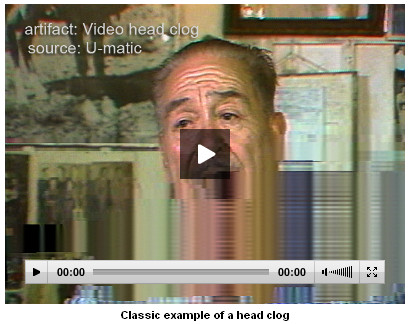
Debris on video heads can prevent direct contact with the videotape and result in an obscured image or a complete loss of image. Photo courtesy of AVAA.
Hannah: There are so many to choose from! One highlight is SDI Spike, because it is a great example of a digitization error – and pretty egregious one at that – and thus demonstrates exactly why careful quality control is critical in preservation workflows. The DV Head Clog entry is noteworthy, as the clip shows how dramatic digital media errors can be, especially when compared to analog ones. Other favorite entries include those that give the reader lots of helpful, practical information about resolving the problem, as seen in Crushed Setup and Head Switching Noise.
Kate: Where do you get your visual examples and data for the Atlas? Are there gaps you’re looking to fill?
Hannah: Many of the entries were created by SMPL staff, drawing on research we’ve done and our on-the-job experience, and most of the media clips and still images derive from issues we encountered in our reformatting projects. A few other generous folks have contributed samples and content, too. We are currently in the process of incorporating content from the Compendium of Image Errors in Analogue Video, a superb book published in 2012 that was motivated by the same need for information to support media art conservation. We are deeply grateful to authors Joanna Phillips and Agathe Jarczyk for working with us on that.
Our biggest content gaps are in the area of audio: we are very eager for more archivists, conservators, engineers and vendors to contribute entries with examples! Also the digital video area needs more fleshing out. The analog video section is pretty well developed at this point, but we still need frames or clips demonstrating errors like Loss of Color Lock and Low RF. We keep a running list of existing entries that are lacking real-life examples on the Contributor’s Guide page.
Kate: I love the recently added audio examples to augment the visual examples. It’s great to not only see the error but also to hear it. How did this come about and what other improvements/next steps are in the works?
Hannah: Emily Perkins, a student of the University of Texas School of Information, approached us about adding the Sound Gallery as part of her final capstone project. Student involvement in the Atlas development is clearly a win-win situation, so we encourage more of that! We are also currently planning to implement a new way to navigate the content in terms of error origin. The new categories – operator error, device error, carrier error, production error – will help those Atlas users who want to better understand the nature of these errors and how they come about.

The new Sound Gallery feature allows users to hear examples of common errors. Photo courtesy of AVAA
Jenny: As part of the NEH project, we want to look closely at the terms and definitions and correlate them with other resources, such as the Compendium of Image Errors in Analogue Video that Hannah mentioned. We also want to include more examples – both still images and video clips – to help illustrate artifacts. As QC Tools becomes more developed, we want to include some of the graphs of common artifacts produced by the software. The hope is that users of the AVAA or of QC Tools will have more than one way to identify the artifacts they encounter.
Kate: It can be challenging to keep the content and enthusiasm going for community-based efforts. What have you learned since the project launched and how has it influenced your current approach?
Hannah: So true: keeping the momentum going is a real challenge. Most of the contributions made to date have been entirely voluntary, and while the NEH funding is a welcome and wonderful development – not to mention a vote of confidence that the Atlas is a valuable resource – we understand fully well that generous donations of time and knowledge on the part of novice and expert practitioners will always be fundamental to the continued growth and success of the Atlas.
It definitely takes a core group of committed people to keep the momentum going and you always need to beat the bush for contributions. In our day-to-day work at SMPL, it has come to the point where I routinely ask myself about a problem we encounter: “is this something we can add to the Atlas? Have we just learned something that we can share with others?” If more practitioners adopted this frame of mind, the wiki would certainly develop more rapidly! I also try to remind folks that you don’t have to be an expert engineer to contribute. Practical information from and for all levels of expertise is our primary goal.
Kate: Is there anything you’d else like to mention about AVAA?
Jenny: We’re hiring! Thanks to funding from the NEH, we are able to hire someone part-time to work exclusively on building out content and community for the AV Artifact Atlas. If you are passionate and knowledgeable about video preservation, consider applying. We’re really excited to hire a dedicated AVAA Coordinator and to see how this position will help the Atlas grow!
Summary of Apache Preflight errors
Page edited by Johan van der Knijff
View Online Johan van der Knijff 2014-01-22T14:58:38ZManaging Digital Preservation – A SCAPE & OPF Executive Seminar
Page edited by Becky McGuinness
View Online Becky McGuinness 2014-01-22T09:29:00ZManaging Digital Preservation – A SCAPE & OPF Executive Seminar
Page edited by Becky McGuinness
View Online Becky McGuinness 2014-01-22T09:29:00ZManaging Digital Preservation – A SCAPE & OPF Executive Seminar > Hotel_DenHaag_Jan2014.doc
File attached by Becky McGuinness
Microsoft Word 97 Document Hotel_DenHaag_Jan2014.doc (55 kB)
Managing Digital Preservation – A SCAPE & OPF Executive Seminar > Hotel_DenHaag_Jan2014.doc
File attached by Becky McGuinness
Microsoft Word 97 Document Hotel_DenHaag_Jan2014.doc (55 kB)
Managing Digital Preservation – A SCAPE & OPF Executive Seminar
Page edited by Becky McGuinness
View Online Becky McGuinness 2014-01-21T16:21:30Z